
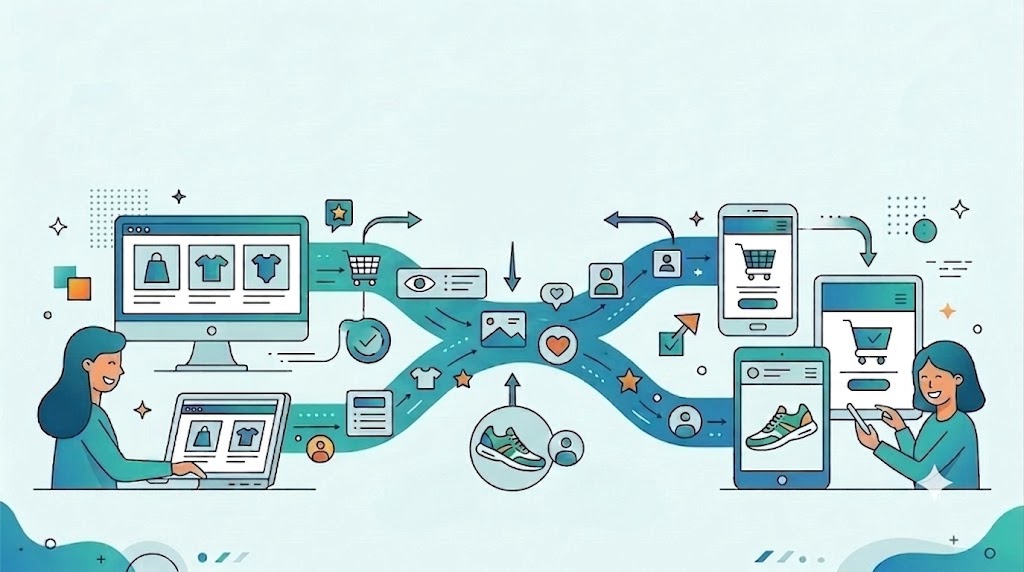

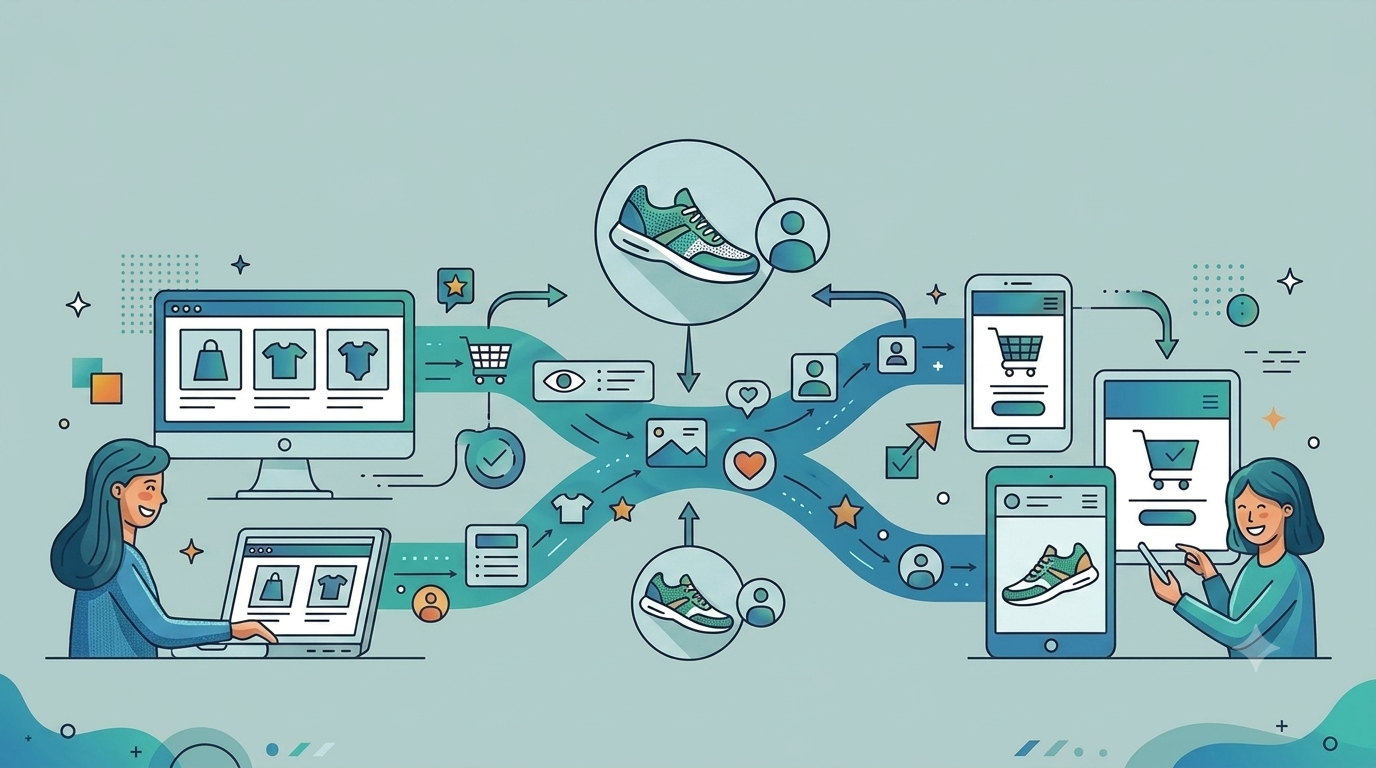
A customer spends some minutes on a laptop browsing different products on a brand’s website, finally selects a product, gets as far as the basket, and then something pulls him away. Three hours later, he opens the brand’s mobile app on the train home. The app shows him a carousel of promotions for products he never looked at. The basket is empty. The product he selected is nowhere on the screen.
Nothing is broken. Every system did exactly what it was configured to do.
But the customer experience took a hit and potentially, so did the sale. Because a seamless customer experience isn’t about what each system knows. It’s about what the customer shouldn’t have to repeat simply because they changed channels or devices.
The Most Valuable Basket May Be the One on the Big Screen
Desktop’s share of digital activity has been shrinking for years. StatCounter put global web traffic at roughly 62-64% mobile versus 35% desktop in January 2026. The ecommerce order data also backs this up: Metorik’s analysis of more than 65 million WooCommerce orders found 72% placed on mobile against 28% on desktop.
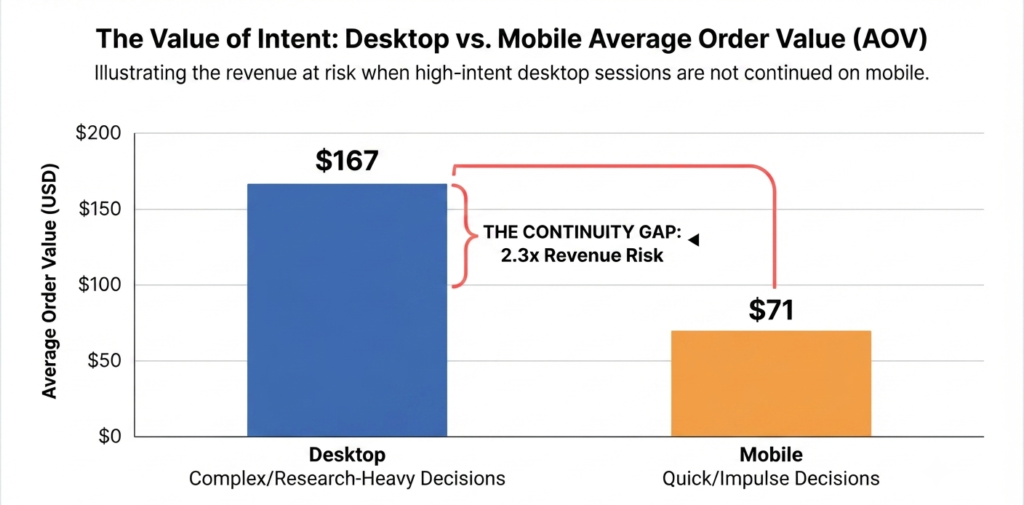
But the value of the orders tells a different story. While the desktop traffic is considerably lower, in the same Metorik dataset, desktop shoppers spent an average of $167 per order against $71 on mobile – more than 2.3 times as much. Kibo Commerce data shows a similar pattern, with average order values of $155 on desktop versus $112 on mobile.
The pattern points to something more interesting than device preference: it reflects the kind of purchase people are comfortable making on a bigger screen.
Research-heavy categories, and products with multiple variants, specifications or configurations, often require customers to compare options across multiple pages or tabs before making a decision. Desktop is naturally better suited to this stage of the journey as there is more screen, comparison is comparatively easier, and customers can keep more information in view at once.
This means the basket created on desktop may represent more than a higher value transaction. It represents a customer who has already invested significant time and effort into making a decision. When that customer moves to mobile later and the basket, product and context disappear, the brand isn’t simply losing a cart, it’s losing the continuity of an already-developed purchase intent. While this cart may be recorded as an abandonment, it is actually a handoff request – and the stack failed to deliver it.
This distinction matters because it changes what you build. If abandonment is caused by friction, you optimise the checkout: fewer fields, faster flows, better payment options. If it’s caused by a failed handoff, the problem sits deeper — in identity, data and continuity. No amount of checkout optimisation can fix a journey that has already lost its context.
And this behaviour is more common than the term “abandonment” suggests. Customers often leave products in their basket with every intention of coming back later. That return might happen a few hours later, on a different device, or through a completely different channel.
The problem is that the customer’s intent can survive the interruption while the experience doesn’t. A customer may add a product on the website, leave, and return later through the mobile app expecting to pick up where they left off. Instead, they are presented with a different experience and have to find the product again, rebuild the basket, or remember where they were in the journey.
This is where continuity becomes more than a nice-to-have. If the business can carry forward what the customer has already done, the interruption doesn’t have to become abandonment. The customer can simply continue.
Why Continuation Is Worth the Engineering
The information is already available in your systems. The products the customer compared, the plans they configured, the variant they added to the basket, everything was captured on the website. The app simply doesn’t use it.
The usual recovery mechanism, email, has its limitations. There is a significant difference between sending a customer a reminder and actually continuing the journey they started.
An in-app prompt has an advantage that email can’t easily replicate. When someone clicks an email, you don’t control which device they’re using, where they land, or what state that page is in. When they open your app, you already know who they are and control what happens next.
When continuation works, a few things change:
- The customer resumes rather than restarts.
The product and its relevant information are available when the customer return. The basket could be built again, and they can continue from the point where they stopped instead of searching for the product and rebuilding the journey. This maintains the continuity between website and mobile application, enhancing the customer experience. - The message reflects actual intent.
Instead of showing some generic promotion or a carousel of products the customer has never looked at, the app can surface the product they had already selected. The experience becomes relevant because it is based on what the customer actually did previously. - The journey becomes visible beyond the website.
The same context can be made available to the app, marketing channels and, where appropriate, the contact centre. The customer’s journey no longer belongs to one channel and could be utilised to deliver personalised content. - Conversion has a better chance of happening.
Since the customer has already been through the researching, comparing and selecting part, removing the need to repeat those steps give them a shorter path to purchase thus improving the conversion rate.
Requirements for a Successful Handoff
A successful handoff or transition doesn’t mean moving the entire customer history from one channel to another. It means carrying forward enough context for the customer to continue without having to start again.
Following four things need to work together:
1. A Common Identity
The website and app need a reliable way to recognise that the person on the laptop is the same person who has just opened the app.
A device ID or browser cookie can tell where an interaction happened, but it doesn’t necessarily describe who the customer is. A persistent customer identifier, consistently used across authenticated web and app interactions, provides the link between those sessions. Google Analytics, for example, uses User-ID to connect activity across sessions, devices and platforms, while Adobe’s identity stitching similarly uses a person ID to connect events across devices and channels.
The important part isn’t simply having an ID. The same identity needs to mean the same thing everywhere. If the website sends one identifier format and the app sends another, the systems can both be technically correct while still failing to recognise the same customer.
2. A Shared View of What the Customer Did
Knowing who the customer is isn’t enough. The brand also needs to know what that customer was doing. This means capturing meaningful journey events: products viewed, products compared, configurations completed, items added or removed from the basket, and the point at which the journey stopped.
Capturing this information is also important for creating right conditions and audiences. A customer who spent time configuring a product should not be treated in the same way as someone who simply visited the homepage.
3. Knowing the Latest State of the Journey
Knowing what the customer did is different from knowing where they are now.
The latest journey state should be able to tell which product was selected, what has already been completed, what remains to be done and, ultimately, what the customer was trying to achieve. Without knowing that, the brand may successfully identity the customer and still send them to a wrong point in the journey.
For example, the customer may have added a product to the basket. The app knows who they are and even knows which product they selected. But if the journey state hasn’t been carried across, the app may show the correct product and still take the customer back to the product page instead of the basket. Thus, knowing the customer and knowing the product isn’t enough. we need to know where they left off.
4. Utilising all this information
It isn’t enough for the data to exist in a CDP, analytics platform or customer database. The app needs to be able to use it. The marketing system needs to be able to act on it.
The handoff is only complete when the next interaction reflects what happened in the previous one. That might mean opening the exact product, restoring a basket, showing the configured plan or presenting a clear “Continue where you left off” action.
The Proof of Concept: Arena Telecom
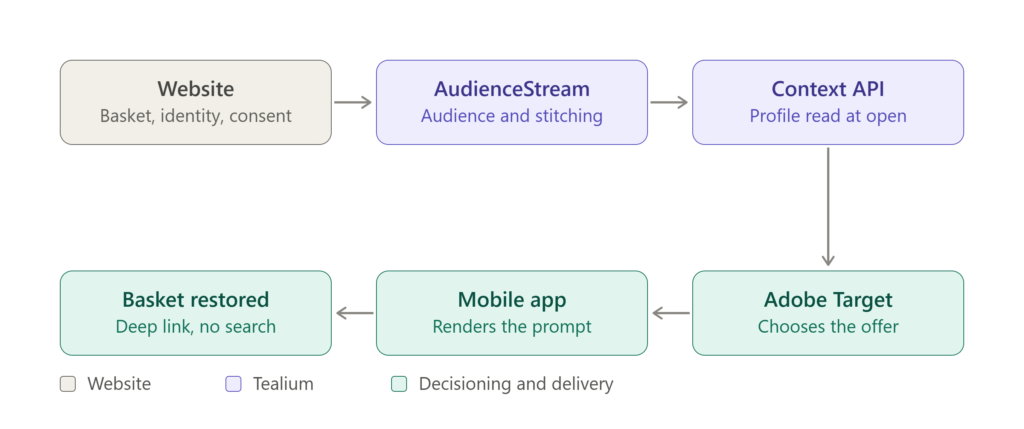
We have built the journey around a demo telecom brand, Arena Telecom, using Tealium AudienceStream, Tealium Context API and Adobe Target Recommendations.
The scenario:
A customer browses handsets and plans on the Arena Telecom website, configures a product, adds it to the basket and leaves before completing checkout.
AudienceStream evaluates the behaviour in real time and places the customer into a Cart Abandoner audience.
Later, the customer opens the Arena Telecom app on their phone – perhaps specifically to continue the purchase, or simply to browse. After authentication, the known customer identifier allows the app session to be stitched to the earlier desktop profile.
The app then requests the small piece of context it needs: the customer’s audience membership, the abandoned product information and consent state, which is delivered via Tealium’s Context API.
The decisioning layer uses that context to personalise the experience. Instead of showing a generic promotion, the app surfaces an offer connected to what the customer was actually doing, delivered by Adobe Target.
The customer taps the prompt and is taken directly to the populated basket.
This ensures No search. No retyping. No starting again from the home screen.
How the Handoff is Configured
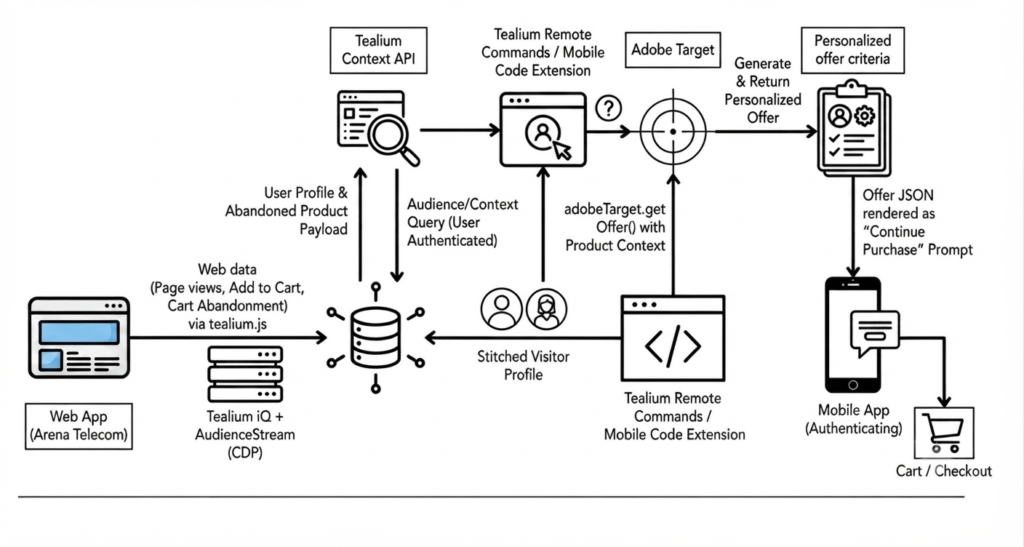
The solution consists of four key components:
1. Collection and the Identity Consistency
Interactions on the website are captured through Tealium, with the data layer carrying the information needed to understand the journey: visitor identity, product identifiers, basket state and consent status.
The identity consistency is particularly important. The website and app need to agree on which identifier represents the same customer across both channels. The field name, format and hashing approach need to be the same on both sides as even a small difference can create problem, and the handoff simply never happens.
2. Audience definition and Visitor Stitching
Once the customer activity is being captured, the next step is deciding when the customer qualifies for continuation.
For the Arena Telecom example, the Cart Abandoner audience can be based on three conditions:
the customer is known or authenticated;
a product has been added to the basket; and
the purchase has not been completed within the defined abandonment window.
The abandonment window shouldn’t necessarily be the same for every business. A customer buying a handset and plan may take several days to make a decision, while someone buying a low-consideration product may return within an hour.
Visitor stitching then connects the customer’s web and app activity once the known identifier becomes available. This is the point where the earlier desktop journey becomes useful to the app. The app isn’t starting with a new visitor. It is continuing the profile that already contains the customer’s previous activity.
3. Reading the Context at App Open
When the customer opens the app and is recognised, the app needs to retrieve only the context required to make the next decision.
In our demo, the app receives information such as the customer’s audience membership, the abandoned product information, the relevant basket context and consent state.
Keeping this payload focused and short is important to not overload the infrastructure. The app doesn’t need the customer’s entire history every time it opens. It needs the small amount of information required to answer a simple question: “Is there something this customer was already doing that we should help them continue?”
There also needs to be a clear response when there is no relevant context. Not every app open will have an unfinished journey, and an empty response should be treated as a normal state rather than an exception.
4. Decisioning and Delivery – Mobile Application Experience
The final step is turning that context into an experience.
In our demo, Adobe Target Recommendations provides the decisioning, while the app uses the resulting information to present a personalised prompt.
Use Case Configuration
The Handoff in Action
This proof-of-concept demo brings the pieces together into one customer journey – from desktop browsing and basket creation to returning through the mobile app and continuing from where the customer stopped.
Watch the demo below to see the complete handoff in action:
What looks like a simple prompt in the app is the result of several systems working together behind the scenes: identity resolution, journey data, audience qualification, decisioning and deep linking. For the customer, none of that should be visible. They simply see the product they were already considering and continue from where they left off.
Conclusion
Customers do not experience a purchase as a sequence of sessions. They experience it as one decision they make across more than one sitting, on whichever screen suited the task at the time. The comparison happens where there is room to compare, while the purchase happens where the phone is, which increasingly means inside an app.
The systems recording these two halves have historically treated each interaction as belonging to a different customer. The cost of that disconnect is concentrated in exactly the wrong place: the desktop baskets, which are often the most valuable ones.
Whether you’re troubleshooting data layer issues, validating tag deployments, or optimizing your Tealium iQ implementation, Dexata helps enterprise teams ensure accurate, reliable, and high-quality data collection. Get in touch to learn how we can help simplify debugging, improve data quality, and maximize the value of your analytics.
Get Your MarTech Value Audit
Identify underutilised capabilities and high-impact optimisation opportunities.
About The Authors

Rohit
Results-driven MarTech Consultant with over 5 years of experience in digital analytics, data collection, and customer data activation. Skilled in Google Analytics, Google Tag Manager, Server-Side Tracking, CAPI, Tealium iQ, OneTrust, Consent Mode, and CDP implementations, with a strong focus on building reliable data ecosystems. Experienced in web and app tracking, reporting, and translating complex datasets into actionable insights that drive business growth, improve customer experiences, and support privacy-first marketing strategies

Karan
Detail-oriented MarTech & Digital Analytics Specialist specializing in Adobe Analytics, Tealium iQ, Tealium AudienceStream (CDP), and Medallia. Experienced in designing and maintaining scalable data collection frameworks, implementing end-to-end tracking solutions, and ensuring the accuracy and integrity of digital data. Adept at transforming customer interaction data into meaningful insights that support informed business decisions, improve digital performance, and strengthen customer engagement. Passionate about delivering reliable analytics solutions that empower organizations to make confident, data-backed decisions.

Connect with Rohit